Log in


Mark Zuckerberg, in a (much) longer version of an essay originally published last month in the opinion pages of the Wall Street Journal:
The defining questions of our age are who will have access to superintelligence and what will we direct it towards. Will it be centralized and restricted to a few institutions, or will it be a tool that empowers everyone?
We propose a philosophy based on individual empowerment as the source of prosperity, invention as the primary purpose of superintelligence, and balance of power as the foundation of safety.
The themes of this essay are reminiscent of those in the “Personal Superintelligence” one Zuckerberg published a year ago. It has the same aspirational messaging about empowering individuals with decentralized superintelligence, the same acknowledgement of the new risks of this technology, and the same total reluctance to define “superintelligence” in any meaningful sense. The term appears 55 times in his latest essay, not one of which explains what it actually is. I suppose it must be synonymous with generative A.I. but the beauty of a proprietary term like this one is in its flexibility.
This is a long — superlong, even — essay and there is much to cover. Others have explored its unsubstantiated predictions, its assumptions, its contradictions, its hypocrisies, and its shallowness.
What I would like to focus on are the specific references Zuckerberg makes to studies, initiatives, or plain anecdotes. Despite the word count, there are few concrete references; much of this is about visionary concepts, not grounded reality. Despite their paucity, Zuckerberg also provides no links or citations, making it particularly difficult to track down the source of claims like this one (emphasis mine):
People fear that automation will outpace individuals’ capability growth, leading to job displacement followed by a difficult period as people learn new jobs. But there is no rule that AI must increase automation faster than it increases individuals’ capabilities or demand for new skills. Recent statistics suggest it may be more likely that individuals’ capability growth could match or outpace automation, in which case people will gain the ability to do many new things before their current jobs change. This would lead to a healthy balance and potentially even job growth.
What this actually refers to I have no idea. There is enough hedging — “recent”, “suggest”, “may be”, “likely” — that it kind of means nothing at all. What I think Zuckerberg is saying in this paragraph is that people can learn new things faster than A.I. can take jobs, but I could not find “recent statistics” backing this up.
There are some relevant observations, though. A June research note (PDF) from the Stanford Digital Economy Lab found, using data from ADP payroll services, that automation-friendly entry-level positions saw employment declines since the November 2022 launch of ChatGPT. Meanwhile, a report published by PWC in June (PDF) suggested increasing wages and employment in jobs that could be automated, even at the entry level. One possible difference is in methodology; while Stanford’s information came from payroll data, PWC’s was from job ads. PWC’s findings were also highly sector-dependent, and indicate entry-level jobs now require more skills to compete with automation. I think PWC’s report is the closest match to what Zuckerberg is arguing, but it is difficult to know for sure. Also, how exactly are young people fresh out of school supposed to develop skills like “team building” and “stakeholder management” before they can be hired?
Here is another anecdote from Zuckerberg’s essay, this time about how Meta is committed to building its physical A.I. infrastructure to support “high-paying local jobs, investment in schools and public services, ensuring energy prices don’t rise, and taking care of the environment”:
For example, in Richland Parish, Louisiana, where Meta is building a large data center, teachers received a $50,000 bonus this year because of the increased tax revenue from our investment. The superintendent told us that teachers are now moving there from across the country and he believes it will become one of the nation’s best school districts.
This is true, but elides the reasons why teachers are somehow getting bonus cheques from a data centre construction project they have nothing to do with. Reporting about this for the New York Times, Jacey Fortin writes that this undeniably exciting windfall is due to a “decades-old ordinance that directs 1 percent of local sales tax revenue to educators”. However:
But many of the workers are likely to leave in the next few years, ending the tax boom. And the Meta payment, which amounted this year to about $22 million, represents only a fraction of the taxes that a company would normally pay to build in the area.
Meta’s tax bill should be over nine times the amount it actually pays, and it will drop precipitously when construction is complete. But Meta made backroom negotiations to get all kinds of concessions and incentives to build its enormous data centre in the region. If the tax breaks had not been implemented and Meta constructed the data centre anyway, it would raise enough money to cover the salaries of all Louisiana public school teachers for more than a year. Eli Tan and Maureen Farrell, also of the Times, noted one resident’s sixfold rent increase thanks to housing demand from construction crews, but quotes the state’s governor saying the tax revenue pre-Meta was “zero”.
Zuckerberg:
We help keep electricity prices low by building our own energy-generating infrastructure wherever we invest. This ensures that not only are we not consuming energy that could have gone to the local communities, but in some cases we even supply a surplus of low-cost energy back to the communities. We think this is an important investment principle for sustainability.
Meta has previously emphasized its sustainability bonafides, but Zuckerberg omits such discussion here, perhaps because it would require considerable caveats that could be a distraction from the essay’s marketing angle. In Louisiana, for example, Meta is paying $2.65 billion to build several power plants with Entergy, but the region still needs more power. So Entergy is looking to acquire a plant in Texas, which could increase customers’ rates. In El Paso, at a different data centre project, Meta is only contracted to cover power plant construction costs for one to five years, after which costs will be transferred to customers. Like in Louisiana, it is also gas-fired.
Closer to home, a gas-fired plant in Alberta will not come online until years after Meta’s to-be-built data centre is up and running, all while electricity rates are predicted to climb.
Zuckerberg:
Developing personal agents requires a new way of thinking about alignment. Most labs today view alignment as a defensive measure for enforcing a centralized set of values. For example, one leading model was aligned to refuse helping draft a letter to prospective parents at a school because it thought standardized testing was unethical.
If this is a real anecdote, I cannot find the source.
And, if you can believe it, those are all the specific and checkable claims Zuckerberg makes in this essay. The rest of it is strikingly like one of those Microsoft concept videos from a decade ago albeit without the After Effects artist expense. One last thing, though, from Zuckerberg:
Privacy is an important foundation for individual empowerment and freedom. […]
Meta continues to make virtually all of its income from advertising targeted by some of the most privacy hostile technologies ever created. While “superintelligence” appears over fifty times in this essay, the words “ads”, “advertising”, and “advertisement” go unmentioned. They appear not even once.


The poster competition is closed. We got 76 entries! Go check them out and vote here. I’ll announce the winner in a couple of days!

Nine months ago I looked at the data and concluded that we were not yet in an AI bubble: The fundamentals of the business models were good. I thought demand for AI would continue growing, and that would drive stocks up. Indeed, demand and stocks kept growing.1 Are we still in that world?
It’s time to reassess what’s going to happen looking forward, and now I’m less confident because of several signals:
Massive stock market swings in AI
Some signals that demand is weakening on the ground
Competition
Cash availability
Let’s look into the details.
This is the South Korean stock market index KOSPI:
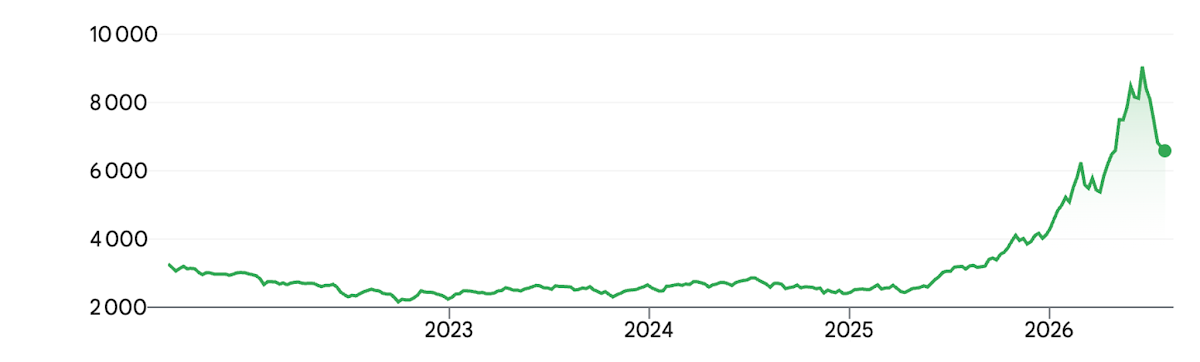
This is because SK Hynix (a company that makes the critical memory needed by AI) and Samsung (which also makes memory, as well as chips) account for about half of that index. After so much growth, a correction was due. Since lots of retail investors had joined, and many of them were leveraged (borrowed to invest), the correction caused a scare and touched off panic-selling. Others who were overleveraged were forced to sell because their stocks had lost more money than they had put in.
South Korean companies are not the only ones that have suffered this correction. At the time of writing, Micron, also a memory company, has lost 32% of its peak value, AMD (chips) has lost 18%, NVIDIA 15%, Intel 36%, Broadcom 19%. These broad drawdowns have caught other investors that were overleveraged, such as Leopold Aschenbrenner’s Situational Awareness.
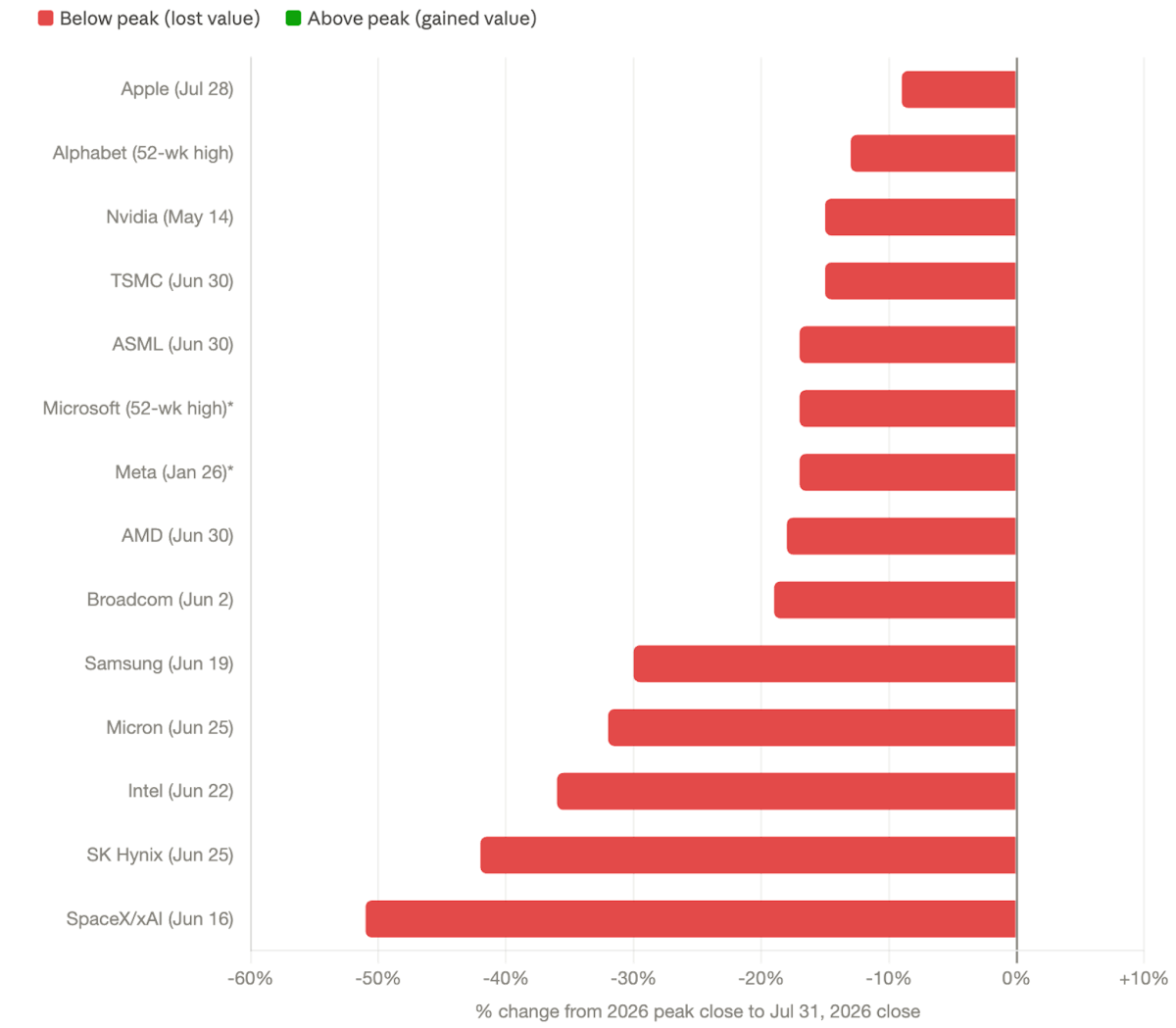
Note that virtually all of these have grown back from their troughs, but is this a stop on the way down, or was the trough a stop on the way up?
I constantly read examples of tech companies saying they’re going to cut their AI spend because it’s gone through the roof—60% of enterprises are doing this, according to the investment bank UBS. These include companies like Uber, Walmart, Amazon, Meta, Microsoft, Cisco, Atlassian, Tesla, Salesforce, or DoorDash. Logically, if the cutting-edge tech companies are cutting AI spend, surely others are following suit, right?
This is Google’s cash flow (how much cash is produced or eliminated by the company):
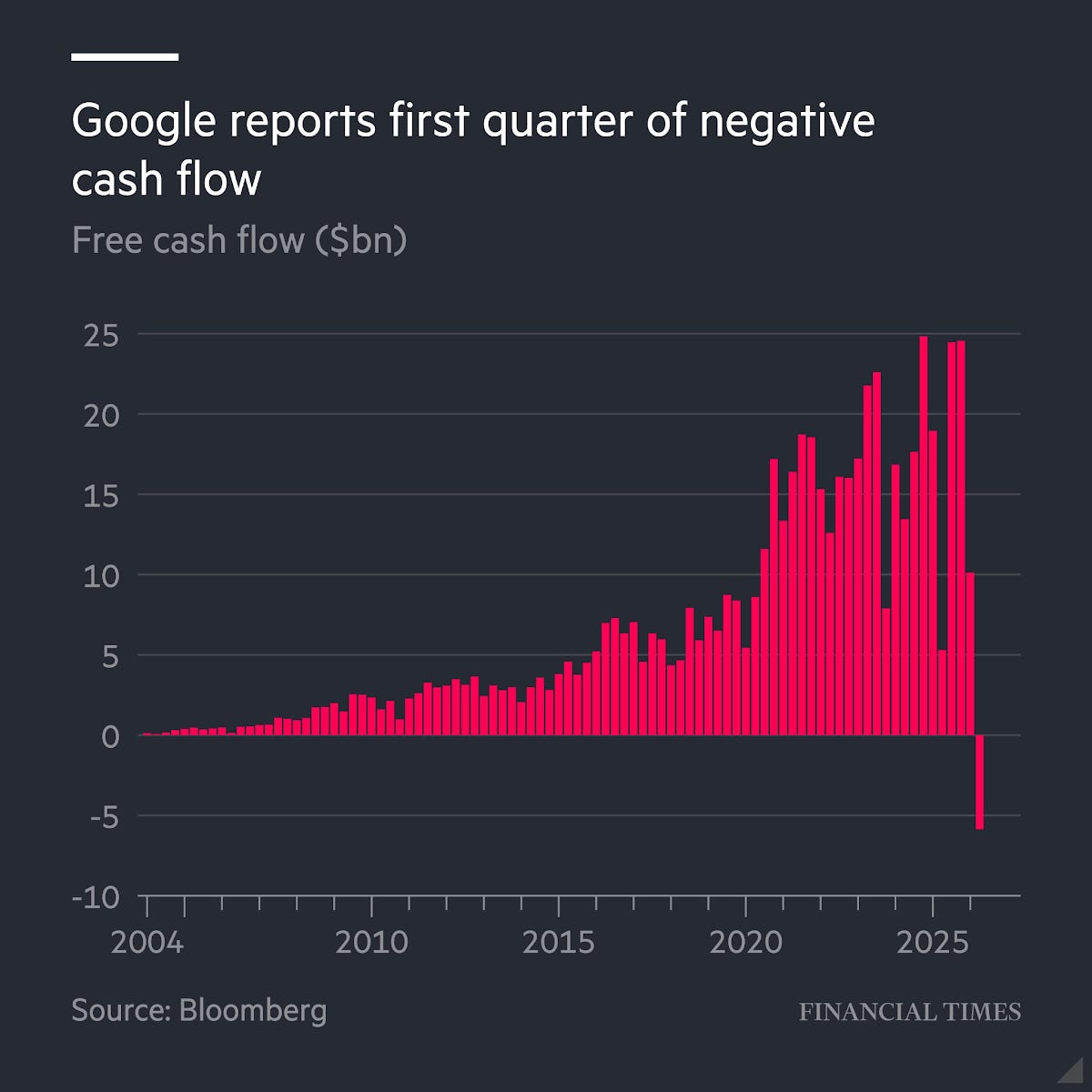
For the first time in its history, Google has burned more cash than it has earned. If it’s doing that, odds are its competitors are also burning through cash at a flabbergasting speed.
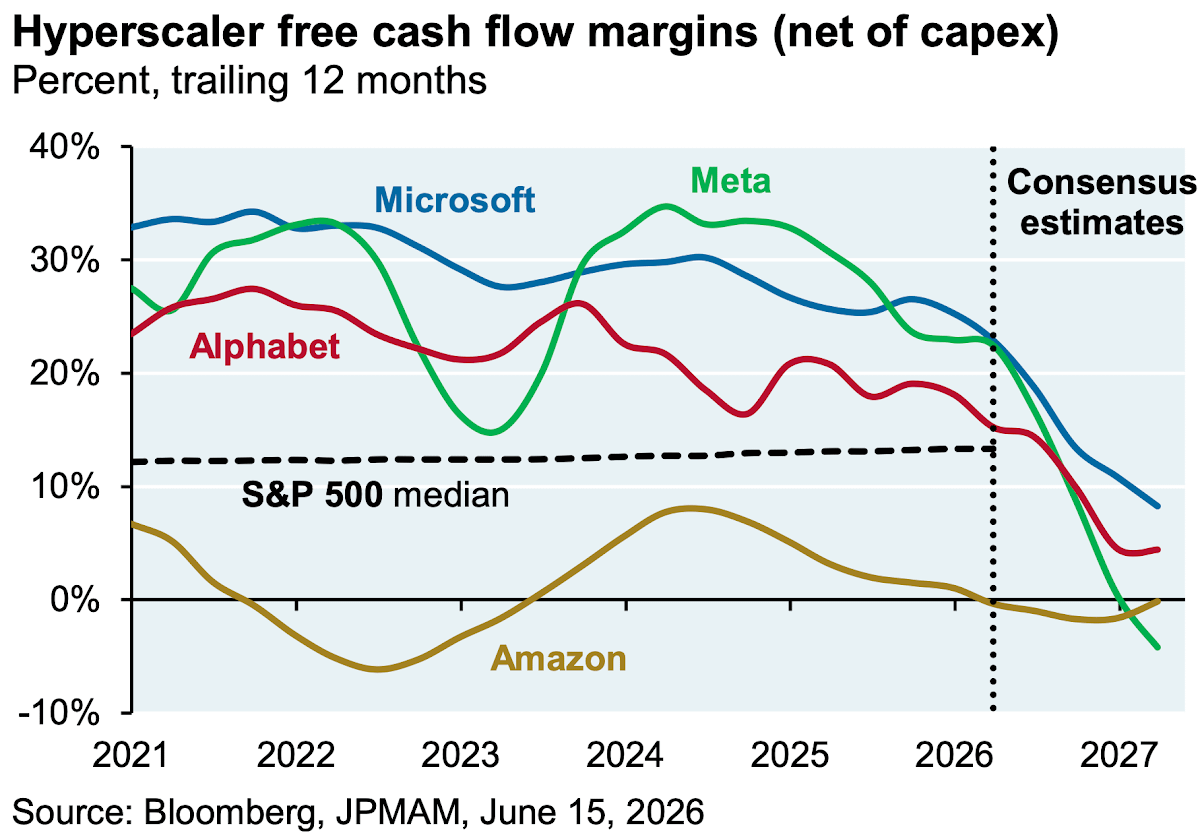
All this money is going from hyperscalers to chip and memory makers.
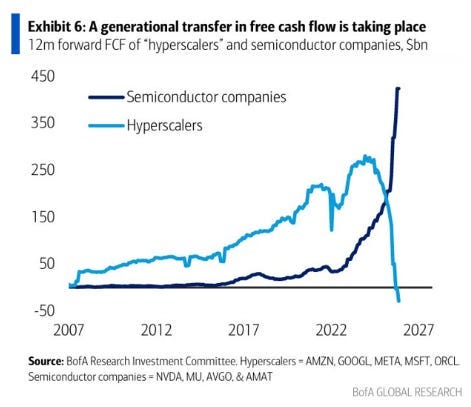
As hyperscalers burn all this cash, they start borrowing. They still have plenty of room to do that though
A couple of weeks ago, the Chinese open-weights model Kimi surprised the world: It beat frontier models like Claude and ChatGPT in some performance evaluations (in the case below, coding):
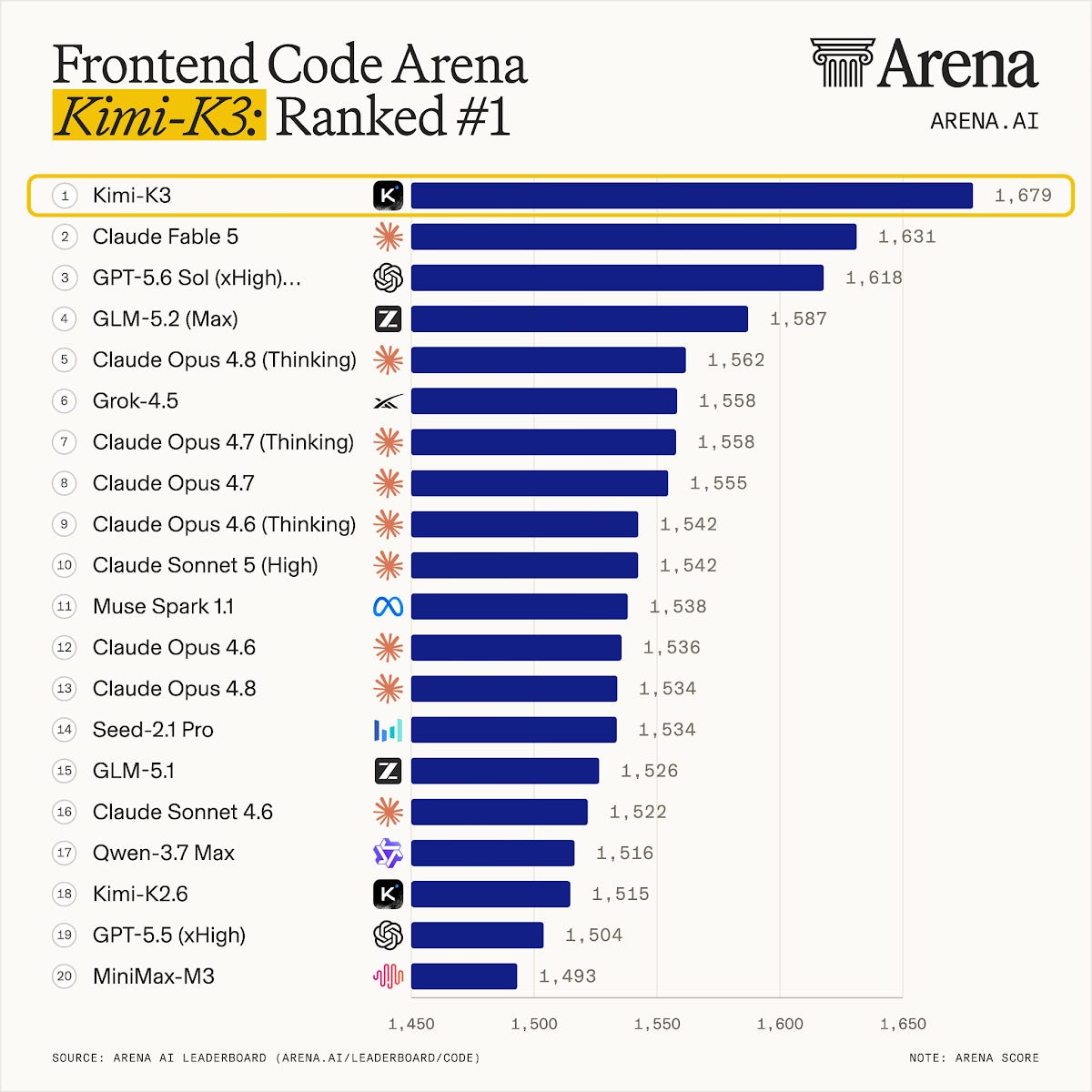
It’s the first time this has happened:
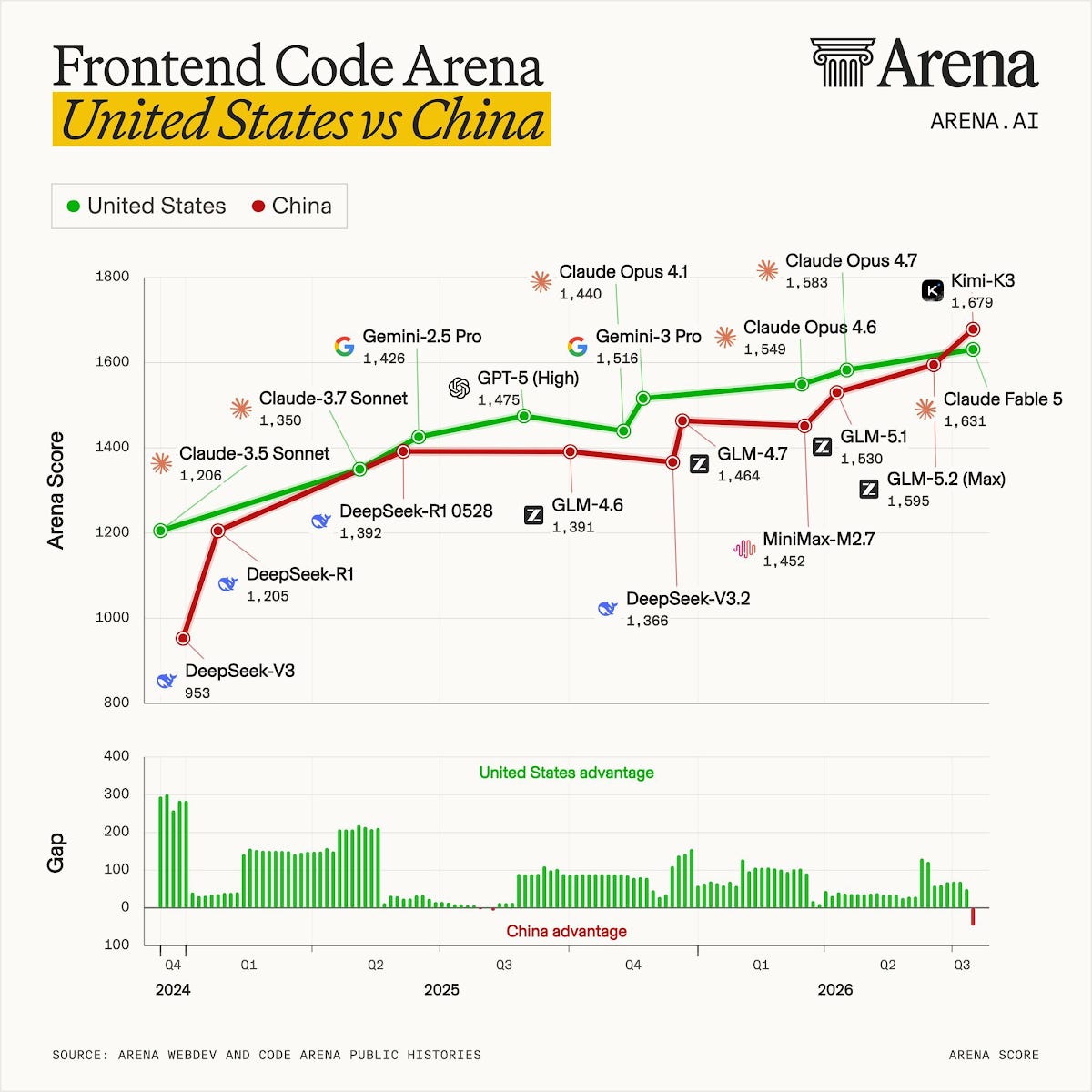
Now this is just for coding, and is only one evaluation. In other measures, it seems like Kimi is still a few months away in performance compared to bleeding edge models.
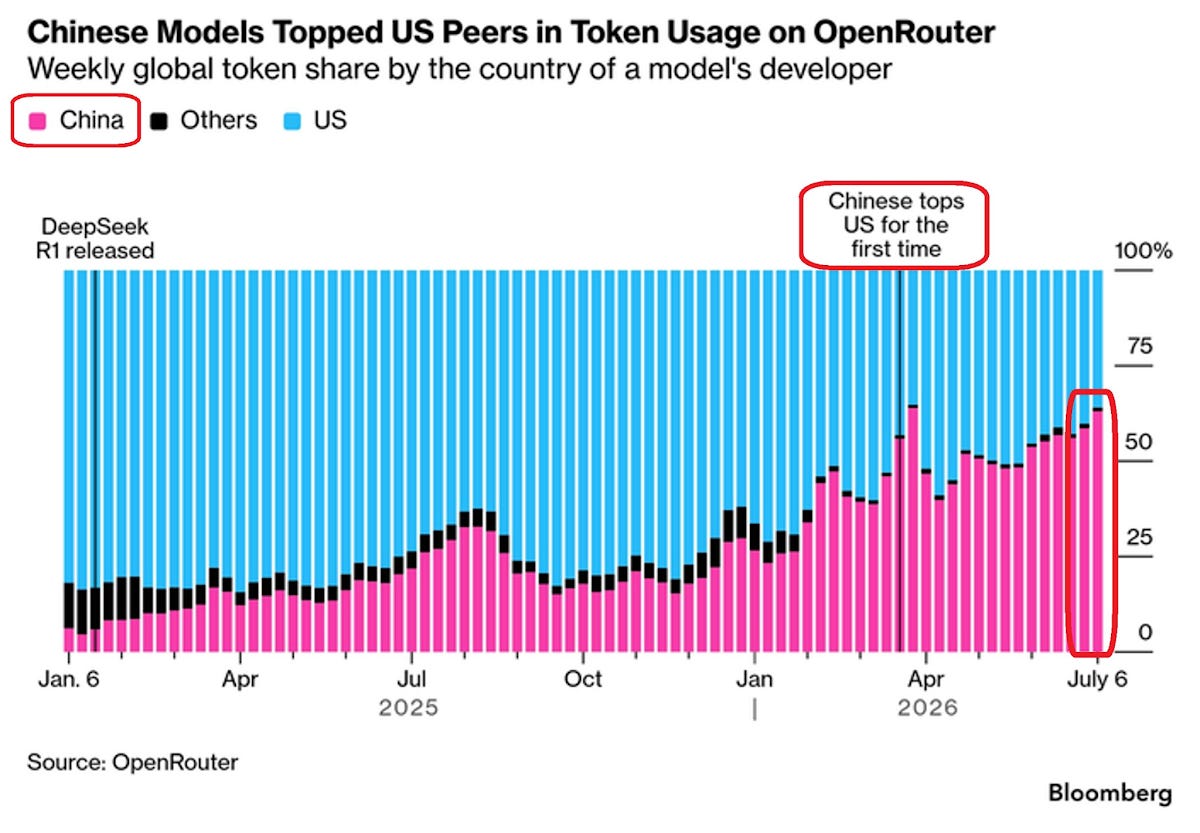
Since they’re basically free to use, the market is moving to them, at least in terms of tokens:
This is a massive deal, because the trillions invested in frontier models like those of OpenAI and Anthropic are contingent on these companies making huge returns, but if their products are easy to copy, their lead will eventually be competed away: Who will pay millions to a company when a free version from China exists? If this continues, wouldn’t investment grind to a halt?
The way this usually happens is through distillation: A company asks another company’s model lots of questions, and then uses the questions and answers to train their own model. The companies that suffer the copying aren’t happy about it, but their argument against it is pretty flimsy: They, themselves, have trained their models on the entirety of the Internet’s content, for which they don’t own any copyright. Hard to accuse others of copyright violation when you’ve done it too.
The lack of scruples of these Chinese models is another upside for them: They have very few harnesses.
After using all three recent releases, Fable, GPT 5.6, and now Kimi, it's clear that the full power of the models has been significantly held back by the safeguard restrictions, leading to the top models being quite literally lobotomized in some areas, which leads to subpar results as the safeguards pollute its entire thinking and problem solving abilities.—Enzo
You can use them for all sorts of nefarious goals (and also for legitimate ones that are nevertheless blocked, such as cyberdefense or research into hot topics), and they won’t stop you.
Overheard: “I’ve switched to Kimi from Claude for a bunch of work. It’s just so much more fun because it just does the thing instead of lecturing you”.—David Sacks, investor and Chair of the President's Council of Advisors on Science and Technology
This is also called dumping: Make a similar product at a fraction of the cost, destroy the industry in the source country, and then control the entire supply chain. China has done this with electric vehicles, solar panels, and many other industries. Get ready to add AI to the list.
The solution is not protectionism, though: It would lead to worse and more expensive models.
But China’s impressive performance is not just due to distillation. They can learn from each other in a way that closed companies like Anthropic, Google, and OpenAI can’t, since they are hiding their secrets from others, and must reinvent the same solutions.
OK, these are all the signals of weakness I can find on the outlook of AI companies and their stocks. But are there signals of strength? And how do they compare to the weakness signals?
Donald Trump’s Big Oil bonanza is an environmental disaster — but the industry’s reaction exposes a larger truth about capitalism itself.
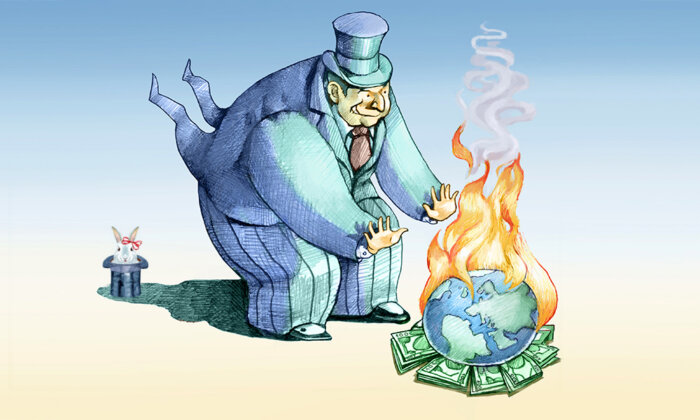
Donald Trump has long called global warming a hoax, but his sweeping anti-climate agenda has stunned even many of his supporters. Since returning to the White House, he’s withdrawn the U.S. from the Paris Treaty, rolled back critical greenhouse gas regulations, and opened up millions of acres of previously protected public land for oil and gas drilling.
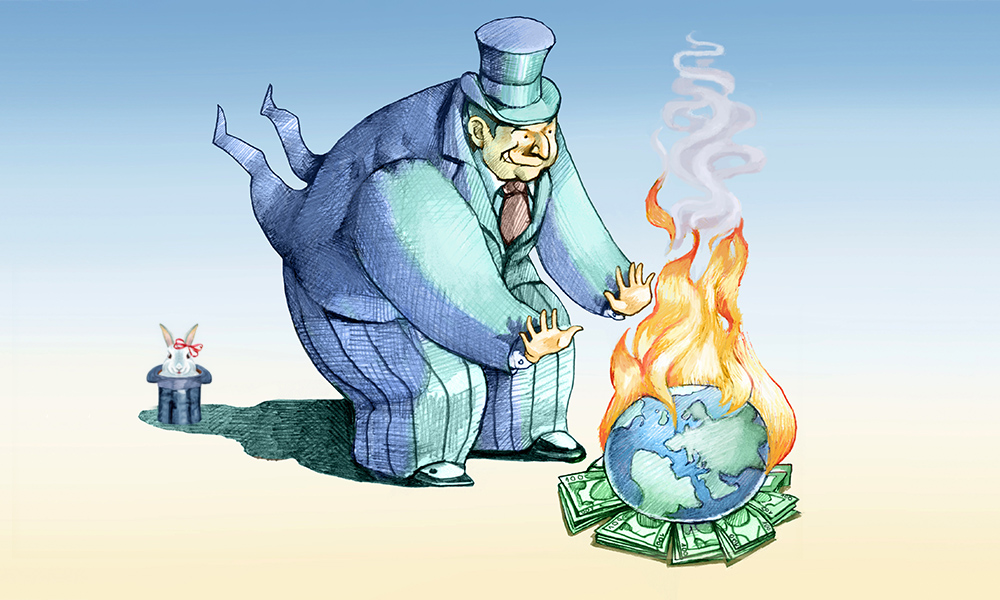
In response, big oil and gas companies have abandoned, without the slightest resistance, the showy public commitments they had previously made to climate transition. For example, BP has slashed green energy expenditures by 70 percent, Equinor has cut back its renewable capacity targets by almost 40 percent, and Chevron has reduced its carbon-reduction capital expenditures to about 5 percent of its total capital expenditures. None of the world’s 12 largest oil and gas companies plan to decrease fossil fuel production, and all of them project that fossil fuels will continue to overwhelm other sources of energy for the foreseeable future, according to a recent evaluation.
Far from a change of heart, this is simply Big Oil returning to form. The petroleum industry has never been serious about curbing emissions, 90 percent of which globally come from fossil fuels. Indeed, after decades of investment, renewables still account for a minuscule amount — about 0.13 percent — of total energy produced by the world’s largest 250 oil and gas companies, according to a recent research paper. “I think the article resolves the debate on whether the fossil fuel industry is honestly engaging with the climate crisis or not,” said the paper’s lead researcher. “Their interest ends with their profits.”
Some oil companies, such as ExxonMobil, continue to promise to reduce emissions to net zero by 2050. This appears to align them with the consensus of climate science that this is necessary globally to limit warming to 1.5° C (2.7° F) above pre-industrial levels. However, Exxon is typical in designating a narrow target of greenhouse gases to eliminate: only those from its own operations, mainly pumping and refining oil and gas, and from buying electricity generated by fossil fuels. This conveniently ignores greenhouse gases from the consumption of its gasoline and other petroleum products, as well as those of its suppliers — which exceed by four times the total covered by Exxon’s commitment.
Exxon wants us to believe that running its pump jacks and refineries on solar and wind power puts it on the side of the climate transition. It’s cynical buffoonery. But it’s also a sign that America’s leaders and electorate have been willfully blind. We should have realized that companies, like Exxon, that knowingly act in pursuit of catastrophe cannot be trusted to stop of their own accord. As Shakespeare might have said, “The fault, dear Brutus, is not in Big Oil but in ourselves.”
The past is prologue. Ever since the advent of industrial capitalism in America in the early 1800s, corporations have consistently served one master, shareholders, delivering them profits by open competition in free markets. From the start, elites have insisted that corporations must regard financial and social objectives as mutually exclusive, even as a single-minded quest for profitability has pushed the system to its breaking point.
We saw the injustice of this belief in the late 19th century, when “robber barons” — who had clawed their way to the top of an unregulated, chaotic economy — justified poverty wages and harsh working conditions by co-opting Charles Darwin’s new theory of evolution, popularized as “survival of the fittest.” Railroad magnate Charles Elliott Perkins — who embodied Social Darwinism by rising from office boy to president of one of the nation’s largest railroads — declared his creed: “That a man is entitled to a living wage is absurd….[If] you take from the strong to give to the weak, you encourage weakness; therefore, let men reap what they and their progenitors sow.”
Early capitalism was marred by periodic, destructive economic downturns. But over time, government acquired fiscal and monetary tools to smooth the boom-and-bust cycles and soften the hard edges of fierce profit-seeking through welfare programs, especially during the Progressive Era (1890s–1920) and the New Deal (1933–1938).
America’s leaders and electorate have been willfully blind.
However, the bedrock of the corporate mission stayed solid even as the government built new structures on top of it. During the New Deal, for example, leading industrialists joined the American Liberty League to oppose innovations like Social Security. A League leader, echoing his counterpart six decades earlier, proclaimed, “You can’t recover prosperity by seizing the accumulation of the thrifty and distributing it to the thriftless and unlucky.”
The permanent establishment of a taxpayer-funded social safety net in the postwar period only reaffirmed corporations’ unwavering fealty to shareholder value. The president of the mighty Dow Chemical Company, Leland Doan, wrote in 1957, “Any activity labeled ‘social responsibility’ must be judged in terms of whether it is somehow beneficial to the immediate or long-range welfare of the business. . . . I hope we never kid ourselves that we are operating for the public interest per se.”
The corporate community resisted even when the tide of public opinion turned against the malign Jim Crow segregation system in the 1950s and ’60s. When U.S. Steel was accused of workplace discrimination in 1963, prominent academic Andrew Hacker struck back forcefully: “If corporations ought to be doing things they are not now doing — such as hiring Negroes on an equal basis with whites — then it is up to government to tell them so. The only responsibility of corporations is to make profits, thus contributing to a prosperous economic system.”
Predictably, that same decade, the corporate establishment dismissed the emergence of the environmental movement. In 1962, when Rachel Carson’s “Silent Spring” shocked the nation by exposing the harm to human and animal life posed by the unrestricted use of pesticides, a chemical industry spokesman responded: “If man were to follow the teachings of Miss Carson, we would return to the Dark Ages, and the insects and diseases and vermin would once again inherit the earth.”
Milton Friedman, Nobel Prize–winning economist and chief economic adviser to Ronald Reagan, famously summed up the unchanging corporate consensus in words still widely quoted today: “There is one and only one social responsibility of business — to use its resources and engage in activities designed to increase its profits.”
For the most part, investors have held their noses and counted their gains. But starting almost a century ago, in 1928, when the invention of mutual funds opened up the stock market to the middle class, “ethical” funds, as they came to be known, entered the arena. They were marketed to individuals and families who wanted their portfolios to reflect their values, and to asset managers who wanted their clients to consider them good citizens.
For a long time, these socially responsible funds were a negligible part of the industry because they typically underperformed the market. These funds used a strategy called negative screening — excluding certain “sin” industries, such as cigarettes, liquor, and weapons. Unfortunately, negative screening typically yields lower returns (sin often pays in the stock market!) and greater price volatility, due to limited diversification. In addition, there is no reason to believe that negative screening has any discernible effect on stock prices, so it has no power to compel corporations to reform.
The answer to this quandary finally came in the early 2000s, in the form of a new stock-picking tool called Environmental, Social and Governance, or “ESG” for short. The seductive promise of ESG is “doing well by doing good” — or getting rich by investing in companies that make the world better. On the back of this dream, capital invested in accordance with ESG principles has grown monumentally, to as much as $30 trillion, about one-quarter of the global total of assets under management.
ESG claims that adroitly managing environmental and social risks will improve profitability and, therefore, stock prices. But ESG only counts risks that are financially material, ignoring all social or environmental harm for which a company faces no financial penalty. As you might expect, this often bears perverse results. For example, cigarette companies kill their customers — you can’t get more anti-social than that! — but smoking is legal, and Big Tobacco rarely faces liability for cancer from smoking. That is why tobacco companies are sometimes awarded good ESG scores and even appear in some ESG stock funds. Likewise, fossil fuel companies, which have historically made high returns and avoided significant regulatory penalties, appear in 80 percent of ESG funds.
The damage that companies inflict on society without literally paying for it entirely escapes ESG’s radar.
Whether it be alcoholism, gambling addiction, gun deaths, climate change, or other iniquities, the damage that companies inflict on society without literally paying for it — or the negative externalities, as they’re called in economics — entirely escapes ESG’s radar.
Worse, the key assumption of ESG — that adept social risk management translates into higher profitability — is fundamentally unprovable. Many studies have attempted to show a strong positive correlation between specific ESG policies, like emissions reductions or heightened employee benefits, and financial metrics, like cost of debt or return on assets. But, as I explain in my forthcoming book on socially responsible investment, very few succeed. In the end, the research only allows you to draw one conclusion with confidence: that it is simply not possible to precisely define ESG practices at a granular level, measure their direct effect on financial performance, and compare these results validly across different companies.
But that does not stop ESG rating agencies from trying. ESG ratings have grown into a big business, since fund managers pay dearly for them to guide their stock selection. The rating agency reports are typically long, detailed, and quantitative — but completely unreliable. These reports may look sober and professional, like credit rating reports from companies such as S&P Global or Moody’s. But credit rating agencies are analyzing real financial values to assess a tangible corporate quality: its ability to repay its debts. The numbers are verifiable and have a proven relevance to the projected outcome. That is why credit ratings have a 90 percent correlation; S&P and Moody’s seldom disagree substantially on a company’s rating.
ESG ratings, by contrast, are all over the map, with a correlation of only 40 percent. Analysts point to three key factors: the rating agencies choose different terms to measure; they measure them with incompatible methods; and they use contradictory methodologies to combine these idiosyncratic measurements into final ratings. These discrepancies build on each other to produce wildly variant final scores. A company denigrated as a dog in ESG terms by one rating agency may be lauded as a star by another.
If ESG is just an illusion, and negative screening a disappointment, how should investors direct their capital to make corporations more socially responsible? The answer is, they shouldn’t bother.
In the game of capitalism, the role of corporations is to make as much money as they can, while playing by the rules. The role of the state, as we learned in the Progressive Era and the New Deal, is to revise the rules periodically to ensure fair play and a socially positive outcome — without hobbling the players. We do want fierce competition, but we don’t want to destroy the playing field in the process.
Today, corporate profits are at their highest proportion of GDP in 50 years, while wages are at their lowest. Overall, income inequality has never been greater, not even in the Gilded Age, the period immediately preceding the Progressive Era, when many toiled in Dickensian poverty while a few, like the Vanderbilt dynasty, flaunted their extravagant and lavish lifestyles. Now, like then, the people, with justification, are losing faith in the system.
It is folly to ask business to do the work of government.
Like our Progressive forebears, we will have to revamp capitalism in order to rescue it. Key objectives must include rebuilding organized labor, since what benefits unions benefits the middle class. We’ll also need to break up de facto corporate cartels that stifle competition, squeeze wages, and lower productivity. To counter the existential threat of climate change, we need a cap-and-trade system that makes industry a partner in carbon reduction, not an opponent, and can serve as a model for other public-private partnerships.
It is folly to ask business to do the work of government. The sooner we stop expecting companies like Exxon to be voluntary agents of social change and acknowledge that they are amoral profit machines, the sooner we can stop the flow of hypocrisy and greenwashing and start working on resolving the social and environmental crises that blight the lives of billions. The path to greater corporate social responsibility leads through the voting booth and the statehouse, not through Wall Street and the C-suite.
Brad Swanson manages socially responsible investments and is an adjunct faculty member in the Costello College of Business at George Mason University. Before entering the finance industry, he was a Foreign Service Officer in the U.S. Department of State, with tours of duty in several African countries. He is the author of the book “Profit vs. Progress: Why Socially Responsible Investment Doesn’t Work and How To Fix It.”
guest post by William Waites
The previous post introduced the plumbing calculus: typed channels, structural morphisms, two forms of composition, and agents as stateful morphisms with a protocol for managing their state. The examples were simple. This post is about what happens when the algebra handles something genuinely complex.
To get there, we need to understand a little about how large language models work. These models are sequence-to-sequence transducers: a sequence of tokens comes in, a sequence comes out. Text is tokenised and the model operates on the tokens.
From the outside, the morphism is simple: !string → !string. A message goes in, a message comes out. But the client libraries (the code that calls the LLM provider) maintain the conversation history and send it back with every call. The actual morphism is
(!string, ![Message]) → (!string, ![Message]): the input message and the accumulated history go in, the response and the updated history come out. The history feeds back. This is a trace in the sense of traced monoidal categories: the feedback channel is hidden from the user, who sees only !string → !string.
Crucially, the model has a limited amount of memory. It is not a memoryless process, but the memory it has is not large: 200,000 tokens for current models, perhaps a million for the state of the art. This sounds like a lot. It is not. An academic paper is roughly 10,000 tokens. A literature review that needs to work with thirty papers has already exceeded the context window of most models, and that is before the model has produced a single word of output.
If you have used any of these agent interfaces, you will have noticed that after talking back and forth for a while, the agent will compact. This is a form of memory management. What is happening is that some supervisory process has noticed the context window filling up, and has intervened to shorten its contents. A naïve approach is to truncate: discard everything before the last N exchanges. A better approach is to feed the entire context to another language model and ask it to summarise, then put the summary back.
This is normally done by specialised code outside the agent, invisible to it.
How to manage agent memory well is an active research area. We do not, in general, do it very well. Truncation loses information. Summarisation loses nuance. Pinning helps but the right pinning strategy depends on the task. These are open questions, and to make progress we need to be able to experiment with different schemes and mechanisms: express a memory management strategy, test it, swap it for another, compare. Not by recompiling specialised code or hardcoding behaviour, but by writing it down in a language designed for exactly this kind of composition. Memory management should be a plumbing program: modular, type-checked, swappable.
So we built an implementation of compaction using the plumbing calculus, and the first thing we did was test it. I ran the protocol on a very short cycle: a single message caused a compaction, because the threshold was set to zero for testing. The compressor fired, produced a summary, rebuilt the agent’s context. The logs showed [compressor] 3404 in / 541 out. The protocol worked.
Then I asked the agent: "have you experienced compaction?"
The agent said no. It explained what compaction is, accurately. Said it hadn’t happened yet. It was confident.
I asked: "do you have a context summary in your window?"
Yes, it said, and described the contents accurately.
"How did that context summary get there if you have not yet compacted?"
The agent constructed a plausible, confident, and completely wrong explanation: the summary was "provided to me by the system at the start of this conversation" as a "briefing or recap." When pressed, it doubled down:
"The context-summary is not evidence that compaction has occurred. It’s more like a briefing or recap that the system gives me at the start of a conversation session to provide continuity."
The agent was looking at the direct evidence of its own compaction and confidently explaining why it was not compaction. We will return to why it gets this wrong, and how to fix it. But first: how do we build this?
At a high level, it works like this. An agent is running: input comes in, output goes out. Together with the output, the agent emits a telemetry report. The telemetry includes token counts: with each transaction, the entire train of messages and responses is sent to the LLM provider, and back comes a response together with a count of the tokens that went in and the tokens that came out. Our agent implementation sends this telemetry out of the telemetry port to anybody who is listening.
The construction involves a second agent. This second agent is a homunculus: the little man who sits on your shoulder and watches what your mind is doing. Here is the topology:
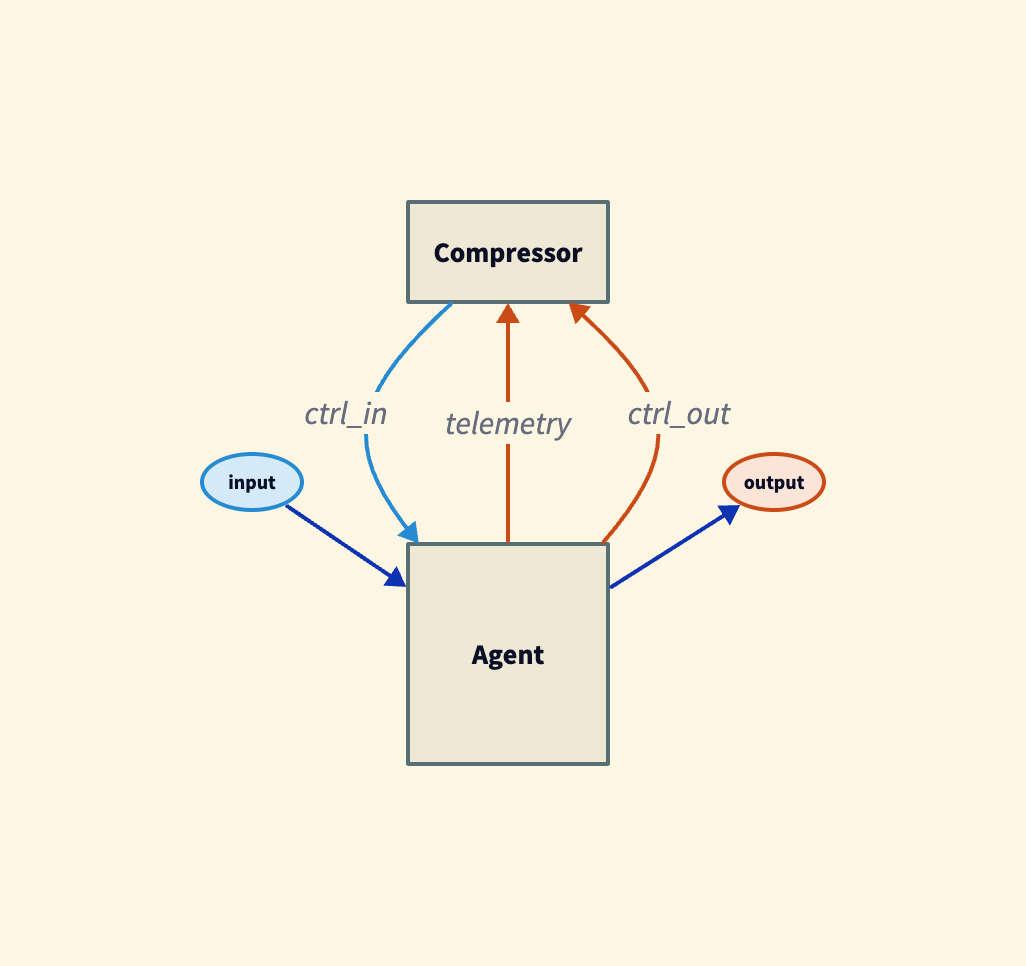
The homunculus listens to the telemetry and says: the memory is filling up. The token count has crossed a threshold. It is time to compact. And then it acts:
• Send pause to the agent’s control port. Stop accepting input.
• Send get memory. The agent produces the contents of its context window.
• Summarise that memory (using another LLM call).
• Send set memory with the compacted version.
• Send resume. The agent continues processing input.
Each step requires an acknowledgement before the next can proceed. This is a protocol: pause, acknowledge, get memory, here is the memory, set memory, acknowledge, resume, acknowledge.
It is possible to express this directly in the plumbing calculus, but it would be painfully verbose. Instead, we use session types to describe the protocol. This is not pseudocode. There is a compiler and a runtime for this language. Here is the protocol:
protocol Compaction =
  send Pause . recv PauseAck .
  send GetMemory . recv MemoryDump .
  send SetMemory . recv SetMemoryAck .
  send Resume . recv ResumeAck . end
The protocol is eight lines. It reads as a sequence of steps:
send, receive, send, receive, and so on. The compiler knows what
types each step carries. Now we wire it up:
let compact : (!CtrlResp, !json) -> !CtrlCmd =
  plumb(ctrl_out, telemetry, ctrl_in) {

    (ctrl_out, ctrl_in)  Compaction as session

    telemetry
      ; filter(kind = "usage" && input_tokens > 150000)
      ; map(null) ; session@trigger

    session@trigger ; map({pause: true})
      ; session@send(Pause)
    session@done(PauseAck) ; map({get_memory: true})
      ; session@send(GetMemory)
    session@recv(MemoryDump) ; compressor
      ; session@send(SetMemory)
    session@done(SetMemoryAck) ; map({resume: true})
      ; session@send(Resume)
}
The first line binds the protocol to the agent’s control ports:
(ctrl_out, ctrl_in) <-> Compaction as session.
This says: the Compaction protocol runs over the control channel, and we refer to it as session. The telemetry line is the trigger: when token usage crosses a threshold, the protocol begins. Each subsequent line is one step of the protocol, wired to the appropriate control
messages.
Here is a direct depiction of the protocol as wired. You can trace it through:
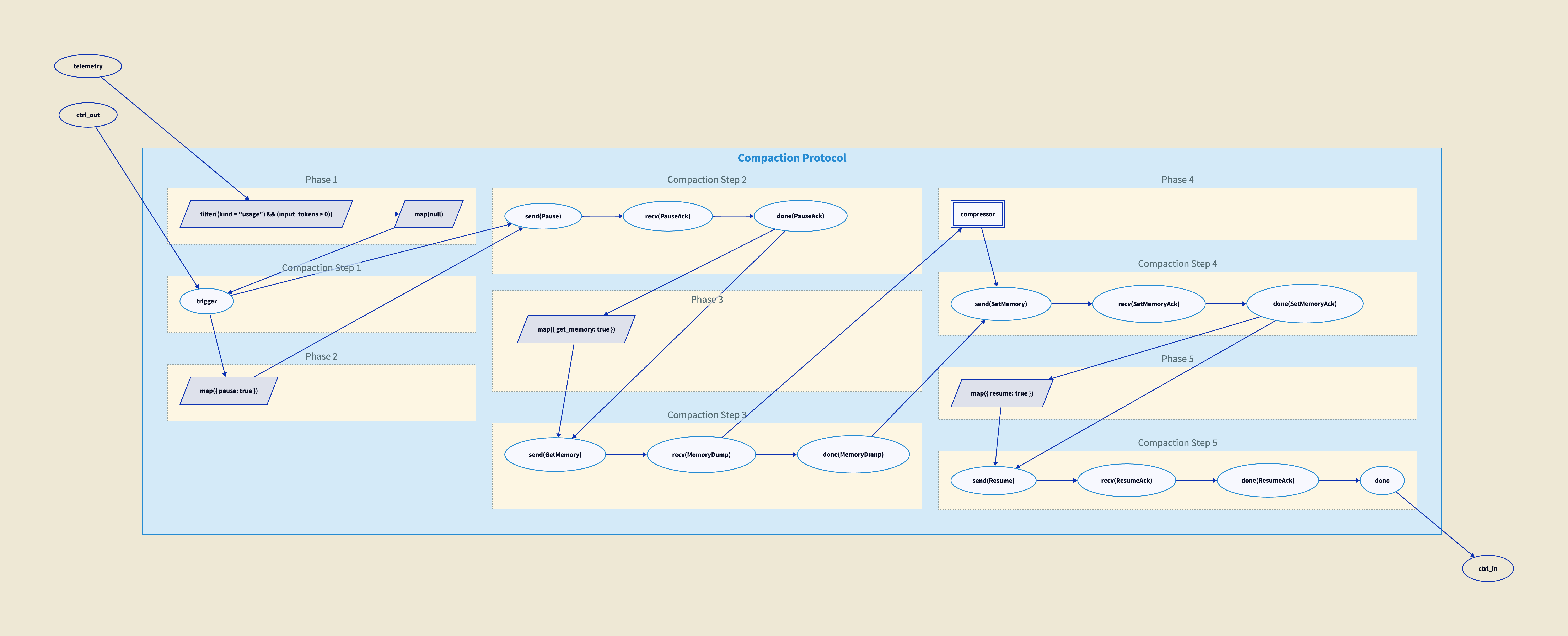
And here is how we wire the homunculus to the agent:
let main : !string -> !string =
  plumb(input, output) {
    let ctrl : !CtrlCmd = channel
    let ctrl_out : !CtrlResp = channel
    let telem : !json = channel

    spawn bot(input=input, ctrl_in=ctrl,
              output=output, ctrl_out=ctrl_out,
              telemetry=telem)
    spawn compact(ctrl_out=ctrl_out,
                  telemetry=telem, ctrl_in=ctrl)
}
The main morphism takes a string input and produces a string output. Internally, it creates three channels (control commands, control responses, telemetry) and spawns two processes: the bot agent and the compact homunculus. The homunculus listens to the bot’s telemetry and control responses, and sends commands to the bot’s control input. The bot does not know the homunculus exists. It just receives control messages and responds to them.
There are two nested traces here. The first is the one from before, inside the agent: messages go in, the output accumulates with everything that came before, and the whole history feeds back on the next turn. We do not see this trace. It is hidden inside the client library. The second trace is the one we have just built: the homunculus. What goes around the outer loop is control: telemetry flows out, commands flow in, acknowledgements come back. The memory dump passes through the control channel at one point in the protocol, but the feedback path is control, not conversation history. Nested traces compose; the algebra has identities for this and it is fine. But they are different loops carrying different things.
The connection between the protocol above and what the compiler actually produces is the functor from session types into the plumbing calculus. This functor works because of barrier.
Why do we need the barrier? Because the protocol is about sending a message and waiting for a response. We can send a message, but we need the response to arrive before we proceed. The barrier takes two streams, one carrying the "done" signal and one carrying the response, and synchronises them into a pair. Only when both are present does the next step begin.
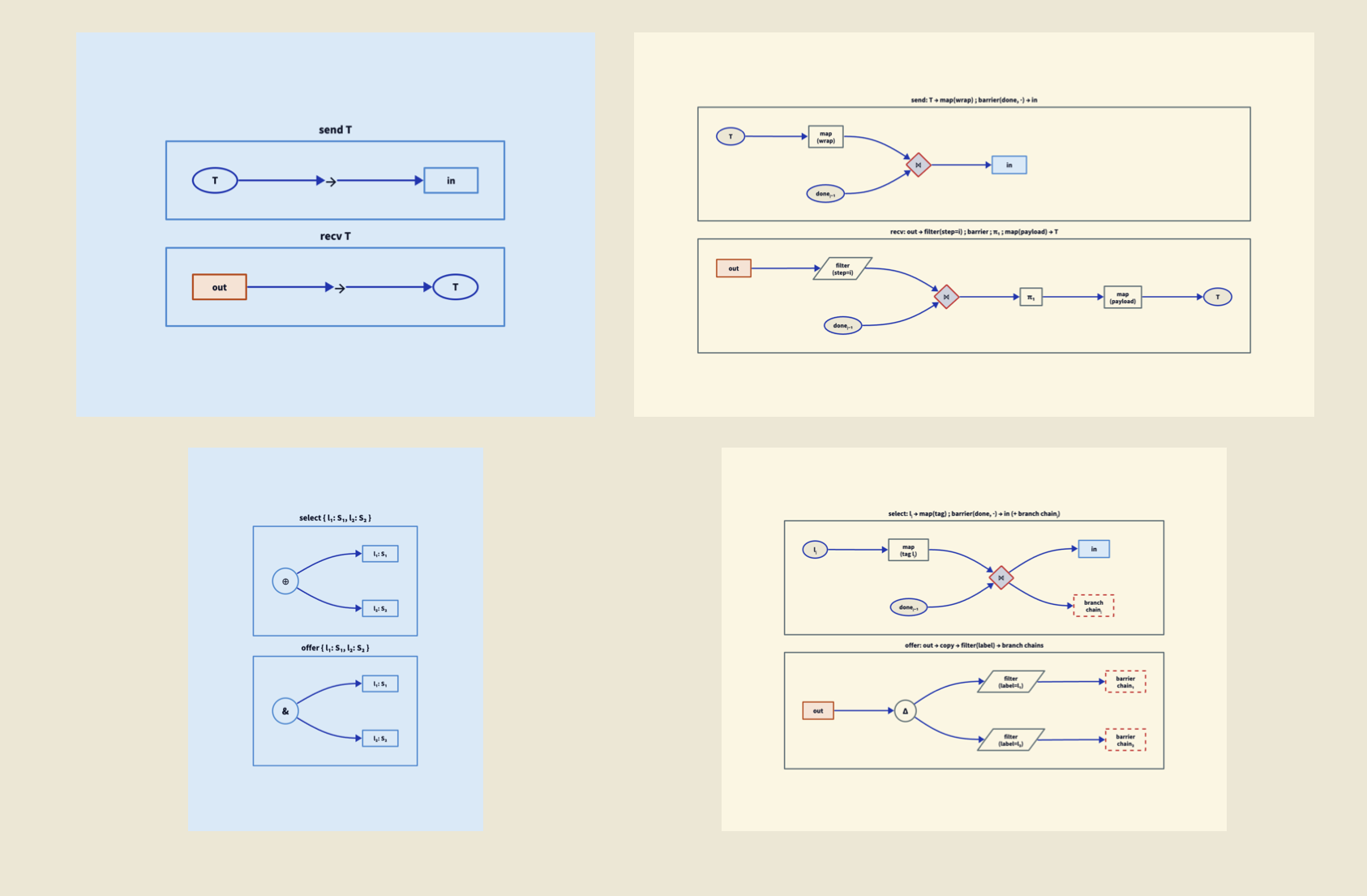
Each session type primitive has a direct image in the plumbing category, and the structure is prettier than it first appears. The primitives come in dual pairs:
In the diagrams below, session types are on the left in blue; their images in the plumbing calculus are on the right in beige.
• send and recv are dual. They map to map and filter, which are also dual: send wraps the value with map, then synchronises via barrier with the done signal from the previous step. Recv filters the control output by step number, synchronises via barrier, then extracts the payload with map.
• select and offer are dual. They map to tag and case analysis, which are also dual: select tags the value with a label via map, synchronises via barrier, and routes to the chosen branch chain. Offer copies the control output and filters each copy by label, routing to the appropriate branch chain.
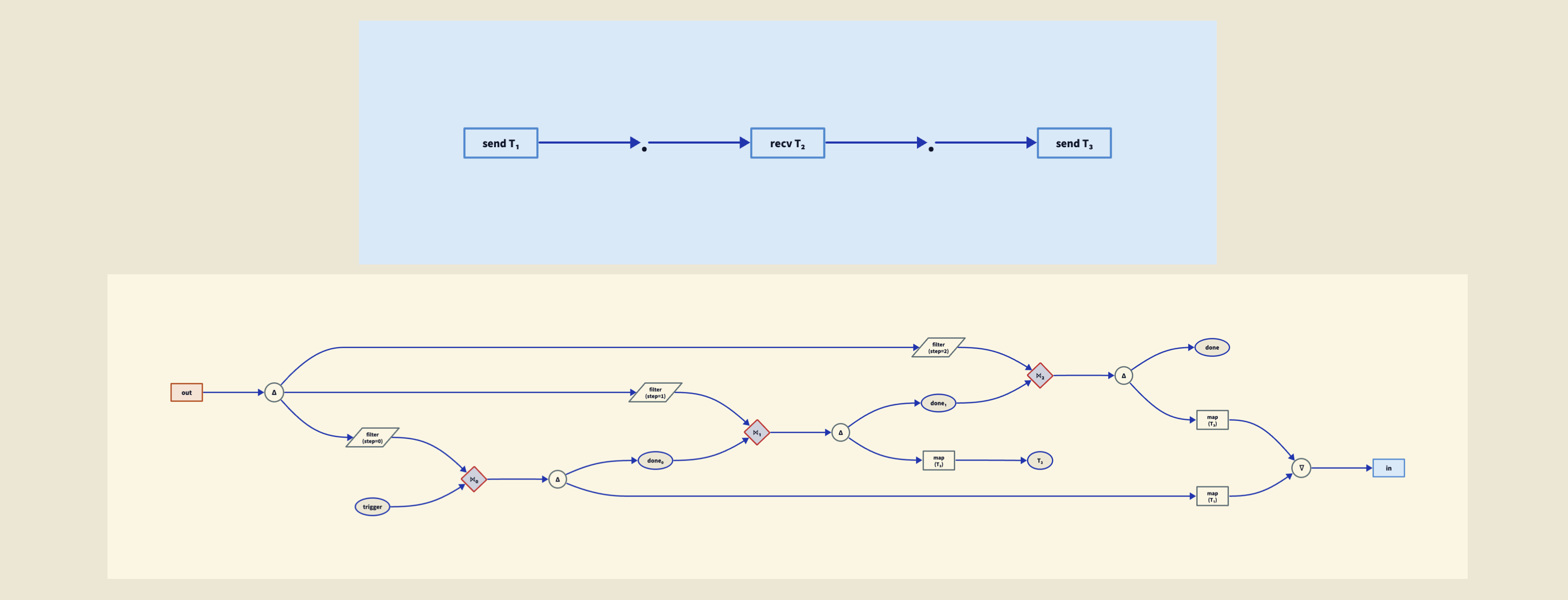
• The sequencing operator (.) maps to a barrier chain. Each send-then-recv step becomes a barrier that synchronises the outgoing message with the incoming acknowledgement, and these barriers chain together to enforce the protocol ordering.
• rec maps to a feedback loop: merge takes the initial
arm signal and the last done signal from the previous iteration, feeds them into the barrier chain body, and copy at the end splits done into output and feedback. The trigger serialisation gate starts
• end is implicit: the chain simply stops. Discard handles any remaining signals.
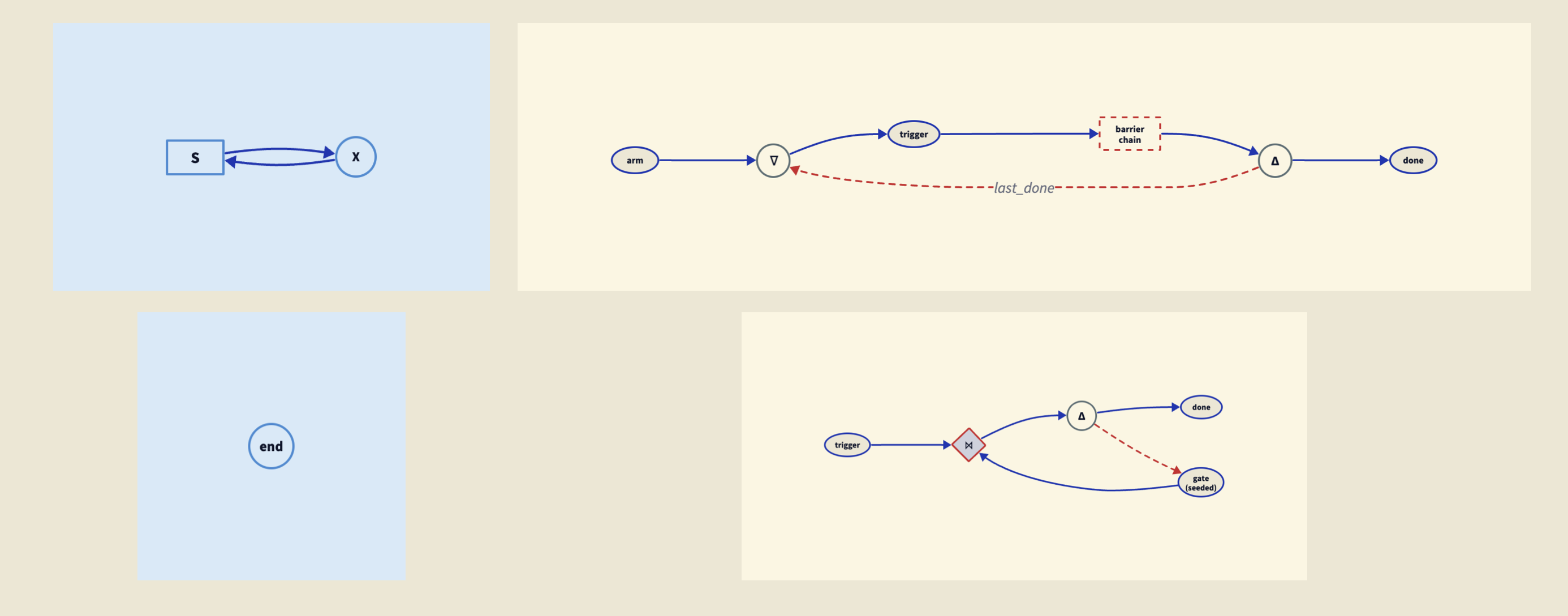
This mapping is a functor. It is total: every session type primitive has an image in the plumbing category, using only the morphisms we already have. Session types are a specification language; the plumbing calculus is the execution language. The compiler translates one into the other.
The reason we do this becomes obvious from the diagram below. It is scrunched up and difficult to look at. If you click on it you can get a big version and puzzle it out. If you squint through the spaghetti, you can see that it does implement the same compaction protocol above. We would not want to implement this by hand. So it is nice to have a functor. If you have the patience to puzzle your way through it, you can at least informally satisfy yourself that it is correct.

There is another feature we implement, because managing the memory of an agent is not as simple as just compressing it.
The problem with compression is that it is a kind of annealing. As the conversation grows, it explores the space of possible conversation. When it gets compacted, it is compressed, and that lowers the temperature. Then it grows again, the temperature rises, and then it is compressed again. With each compression, information is lost. Over several cycles of this, the agent can very quickly lose track of where it was, what you said at the beginning, what it was doing.
We can begin to solve this with document pinning. The mechanism is a communication between the agent and its homunculus, not shown in the protocol above. It is another protocol. The agent says: this document that I have in memory (technically a tool call and response, or just a document in the case of the prompts), pin it. What does that mean? When we do compaction, we compact the contents of memory, but when we replace the memory, we also replace those pinned documents verbatim. And of course you can unpin a document and say: I do not want this one any more.
Either the agent can articulate this or the user can. The user can say: you must remember this, keep track of this bit of information. And the agent has a way to keep the most important information verbatim, without it getting compacted away.
This accomplishes two things.
First, it tends to keep the agent on track, because the agent no longer loses the important information across compaction cycles. The annealing still happens to the bulk of the conversation, but the pinned documents survive intact.
Second, it has to do with the actual operation of the underlying LLM on the GPUs. When you send a sequence of messages, this goes into the GPU and each token causes the GPU state to update. This is an expensive operation, very expensive. This is why these things cost so much. What you can do with some providers is put a cache point and say: this initial sequence of messages, from the beginning of the conversation up until the cache point, keep a hold of that. Do not recompute it. When you see this exact same prefix, this exact same sequence of messages again, just load that memory into the GPU directly. Not only is this a lot more efficient, it is also a lot cheaper, a factor of ten cheaper if you can actually hit the cache.
So if you are having a session with an agent and the agent has to keep some important documents in its memory, it is a good idea to pin them to the beginning of memory. You sacrifice a little bit of the context window in exchange for making sure that, number one, the information in those documents is not forgotten, and number two, that it can hit the cache. This is explained in more detail in a separate post on structural prompt preservation.
Why does the agent get this wrong? In one sense, it is right. It has not experienced compaction. Nobody experiences compaction. Compaction happens in the gap between turns, in a moment the agent cannot perceive. The agent’s subjective time begins at the summary. There is no "before" from its perspective.
The summary is simply where memory starts. It is like asking someone "did you experience being asleep?" You can see the evidence, you are in bed, time has passed. But you did not experience the transition.
The <context-summary> tag is a structural marker. But interpreting it as evidence of compaction requires knowing what the world looked like before, and the agent does not have that. It would need a memory of not having a summary, followed by a memory of having one. Compaction erases exactly that transition.
The fix is not complicated. It is perfectly reasonable to provide, along with the user’s message, self-knowledge to the agent as metadata. What would it be useful for the agent to know?
The current time. The sense of time that these agents have is bizarre. We live in continuous time. Agents live in discrete time. As far as they are concerned, no time passes between one message and the next. It is instantaneous from their point of view. You may be having a conversation, walk away, go to the café, come back two hours later, send another message, and as far as the agent is concerned no time has passed. But if along with your message you send the current time, the agent knows.
How full the context window is. The agent has no way of telling, but you can provide it: this many tokens came in, this many went out.
Compaction cycles. So the agent knows how many times it has been compacted, and can judge the accuracy of the contents of its memory, which otherwise it could not do.
With the compaction counter, the agent immediately gets it right:
"Yes, I have experienced compaction. According to the runtime context, there has been 1 compaction cycle during this session."
No hedging, no confabulation. Same model, same prompts, one additional line of runtime context.
This matters beyond the compaction story, because many of the failures we see in the news are context failures, not alignment failures.
While we were writing this post, a story appeared in the Guardian about AI chatbots directing people with gambling addictions to online casinos. This kind of story is common: vulnerable people talking to chatbots, chatbots giving them bad advice. The response of the industry is always the same: we need better guardrails, better alignment, as though the chatbots are badly aligned.
I do not think that is what is happening. What is happening is a lack of context. Either the chatbot was never told the person was vulnerable, or it was told and the information got lost. Someone with a gambling addiction may start by saying "I have a gambling problem." Then there is a four-hour conversation about sports. Through compaction cycles, what gets kept is the four hours of sports talk. The important bit of information does not get pinned and does not get kept. Context drift. By the time the user asks for betting tips, the chatbot no longer knows it should not give them.
The way to deal with this is not to tell the language model to be more considerate. The way to deal with it is to make sure the agent has enough information to give good advice, and that the information does not get lost. This is what document pinning is for: pinned context survives compaction, stays at the top of the window, cannot be diluted by subsequent conversation. This is discussed further in a separate post on structural prompt preservation.
But pinning is only one strategy. The field is in its infancy. We do not really know the right way to manage agent memory, and we do not have a huge amount of experience with it. What we are going to need is the ability to experiment with strategies: what if compaction works like this? What if pinning works like that? What if the homunculus watches for different signals? Each of these hypotheses needs to be described clearly, tested, and compared. This is where the formal language earns its keep. A strategy described in the plumbing calculus is precise, checkable, and can be swapped out for another without rewriting the surrounding infrastructure. We can experiment with memory architectures the way we experiment with any other part of a system: by describing what we want and seeing if it works.
When the first draft of this post was written, it was a mystery why the field had not thought to give agents self-knowledge as a routine matter: what they are doing, who they are talking to, what they should remember. Prompts are initial conditions. They get compacted away. There are agents that save files to disc, in a somewhat ad hoc way, but we do not give them tools to keep track of important information in a principled way.
Contemporaneously with this work, some providers have started to do it. For example, giving agents a clock, the ability to know what time it is. This is happening now, in the weeks between drafting and publication. The field is only now realising that agents need a certain amount of self-knowledge in order to function well. The compressed timeline is itself interesting: the gap between "why has nobody done this?" and "everybody is starting to do this" was a matter of weeks.
The mechanisms we have presented here allow us to construct agent networks and establish protocols that describe rigorously how they are meant to work. We can describe strategies for memory management in a formal language, test them, and swap them out. And perhaps beyond the cost savings and the efficiency increases, the ability to experiment clearly and formally with how agents manage their own memory is where the real value lies.


NEW RESOURCES
Gizmodo: Opera Has Turned 30—and Is Celebrating With a Compelling Tribute to Web Nostalgia. “To celebrate the milestone, Opera is doing something brilliantly engaging: It’s put together a Web Rewind archive site that memorializes some of the best online moments and memes of the last three decades. From the classic modem dialing tone sounds, to MySpace and the top eight friends paradigm, it’s a lot of nostalgic fun.”
EVENTS
Flickr Blog: MODE by Flickr: The World’s Photography Festival. “You know those mysterious emails we’ve been sending? The cryptic hints, the ‘something big is coming’ energy? Well, the wait is over. Welcome MODE by Flickr—an immersive three-day photography festival coming to Minneapolis September 18-20, 2026.”
TWEAKS AND UPDATES
Tubefilter: YouTube increases the value of its Premium Lite tier through Background Play and Downloads. “Last year, YouTube launched its Premium Lite tier as a slimmed-down, cheaper alternative to the standard YouTube Premium subscription. Now, YouTube is looking to make that deal even sweeter by adding a pair of useful features for Lite subscribers: Say hello to Background Play and Downloads.”
Reuters: China’s Baidu revenue falls as AI cloud growth fails to offset ad weakness. “China’s largest search engine operator Baidu reported a 4% revenue drop for its December quarter on Thursday, as persistent weakness in its mainstay advertising business offset strong growth in its cloud business.”
AROUND THE SEARCH AND SOCIAL MEDIA WORLD
Bloomberg: OpenAI Says ChatGPT Refused to Help Chinese Influence Operations. “OpenAI said its ChatGPT AI service refused to assist an individual associated with Chinese law enforcement in planning an online campaign to discredit the Japanese prime minister.”
Fox 5 Atlanta: Bud Smith’s Atlanta archive: 1.2M photos seek a permanent home. “Smith, who will turn 78 in April, has documented a front-row seat to history from the basement of his East Point home. His collection, which includes approximately 1.2 million pictures and 60,000 rolls of film, features some of the nation’s most notable newsmakers.”
New York Times: Women Are Falling in Love With A.I. It’s a Problem for Beijing. This link goes to a gift article. “China’s ruling Communist Party wants young women to prioritize getting married and having babies. Instead, many of them are finding romance with chatbots. It is complicating the government’s efforts to reverse the country’s shrinking population and a birthrate hovering at the lowest level in over 75 years.”
SECURITY & LEGAL
Courthouse News Service: Ohio school district sues Microsoft, Roblox over video game harm to students. “A small Ohio school district sued three big video game producers with a global reach, claiming youngsters are attracted to and addicted to the online games that have behavioral and financial consequences for the school district and its students.”
TASS: Google fined nearly $300,000 for promoting VPN services. “Moscow’s Tagansky District Court has ordered Google LLC to pay 22.8 mln rubles ($298,600) for promoting VPN services via Google Play, a TASS correspondent reported from the courtroom.”
RESEARCH & OPINION
Northeastern University: How can you avoid AI sycophancy? Keep it professional. “Researchers recently discovered that the overly agreeable behavior of chatbots depends on what role the AI plays in a conversation. The more personal a relationship, the more they will tell you what you want to hear.” Good afternoon, Internet…
This newsletter is free but most of the things that go into making it aren’t! Help me afford new socks and fancier bean stew by supporting ResearchBuzz on Patreon. Not interested in commitment? Perhaps you’d buy me an iced tea. Don’t have any money but still want to support? I know how that feels. Share this newsletter or tell a friend about it. I live at Calishat. See my other nonsense at SearchTweaks, RSS Gizmos, Local Search America, WikiTwister, and MiniGladys.